Open an .md file, paste Markdown or a GitHub link, and read it formatted the way GitHub shows it. This Markdown viewer works in your browser: nothing to install, files stay on your device.
READMEexample file132 words1 min read
Tide tables you can read at a glance.
What it does
Tidepool draws the next seven days of high and low water for a tide station, with the times you care about: when the beach is walkable and when the harbour bar is safe to cross.
Drop your .md file hereAdd its images too and they will show in place.
Examples
12 documents from one made-up open-source project, a tide-table app called Tidepool. Open any of them in the Markdown viewer to see how it handles that kind of file.
tidepool / docs12 files
Or open a real README from GitHub in the Markdown viewer:
the parser this site uses
diagrams, badges, HTML
a very long list
images and badges
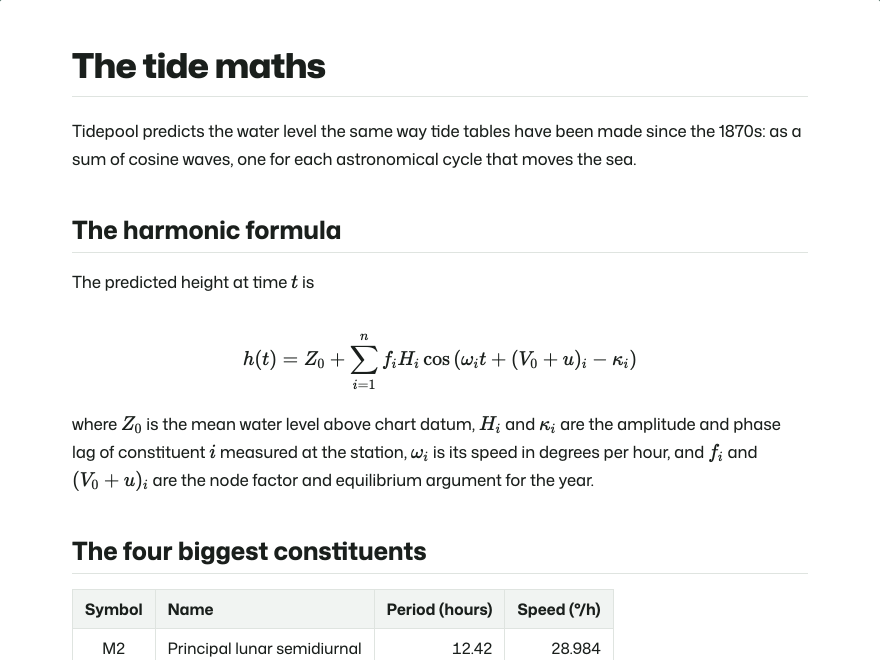
The tide maths: LaTeX math, table
How to use the Markdown viewer
The Markdown viewer reads the file in your browser and lays it out the way GitHub does. The Markdown viewer uploads nothing.
Open file (on a computer you can also drag the file onto the viewer), press Paste (or just paste anywhere on the page), or paste a GitHub, Gist, GitLab, Bitbucket or raw link and press Open. The Markdown viewer takes several files at once.
The Markdown viewer keeps Contents (a side list, or a button on a phone) in step with your reading. The Markdown viewer follows your device's dark mode; Reading (the sliders button, Aa on a phone) sets it to Light or Dark, or picks a serif typeface, larger text or a wider line.
To fix a typo, choose Split (Source on a phone) and edit the text while the Markdown viewer redraws the page as you type; both sides scroll together and the Markdown viewer keeps your place when you switch.
When you are done, the Markdown viewer can Print / PDF, Copy for Docs, Download a Word file, HTML or .md, or Share a link. On a phone those buttons are labelled PDF, Copy, Save and Share in the Markdown viewer.
What the Markdown viewer renders
The Markdown viewer covers GitHub Flavored Markdown, plus the extras GitHub added later.
### Tide check

> [!TIP]
> Evening low at **20:01**, 0.4 ft.

| Time | Height |
| :--- | -----: |
| 12:58 | 5.6 ft |
| 20:01 | 0.4 ft |

- [x] Walk out to the reef
- [ ] Back before 21:30
Tide check
Tip
Evening low at 20:01, 0.4 ft.
Time
Height
12:58
5.6 ft
20:01
0.4 ft
Walk out to the reef
Back before 21:30
The same lines as typed, and in the Markdown viewer with Show Markdown marks in the margin on: the symbols behind each block stay in the margin, a quick way to learn the syntax from a file you already have.
You write
The Markdown viewer shows
| a | b | with :--- / :---: / ---:
A table with left, centre or right columns, and a Copy CSV button under it
Emoji, keys and fold-outs; scripts, forms and inline styles are removed
[[Note]] [[Note#Part|text]] ![[pic.png]]
Obsidian wiki links between open notes, and embedded pictures
> [!info] Title > [!faq]- Folded
Obsidian callouts with their own title, icon and fold-out
==highlight== %%comment%%
Marked text; comments stay hidden
Headings get the anchor names GitHub gives them, so a link to #install in a README works in the Markdown viewer too, and tables scroll sideways on a phone instead of breaking the page.
Markdown viewer to PDF, Docs and links
Print or save as PDF
Print / PDF in the Markdown viewer prints only the document: code blocks, table rows and diagrams stay whole across pages, and link addresses print after the link text.
Markdown viewer to Word (.docx)
Download, then Word (.docx), turns the Markdown viewer's page into a real Word document: headings stay headings in the navigation pane, lists stay numbered, tables keep their header row, links keep working and footnotes become Word footnotes. The Markdown viewer places pictures and diagrams in the file, so it opens complete in Word, Google Docs or Pages.
Paste into Google Docs, Word or email
Copy for Docs in the Markdown viewer puts formatted text on the clipboard, with table borders and code shading written in so they survive the paste. It is also the easy way to tidy an answer from ChatGPT, Claude or Copilot: paste the Markdown into the Markdown viewer, then copy it out as real formatting.
Send it to someone
Share in the Markdown viewer gives you a link. For a document from a web address, the link opens that address in the Markdown viewer again, so any size works. For pasted or local text, the text itself travels inside the link, up to 60,000 characters after compression.
When a picture is missing
A README opened in a Markdown viewer from your computer points to images in a folder beside it. Drop the images with the .md file, or press Add image… where one is missing, and the Markdown viewer puts them in place.
A Markdown viewer for any device
An .md file is plain text, so every computer opens it, but only a Markdown viewer shows it formatted.
Device
Opens .md files in
With this Markdown viewer
Markdown viewer for Windows
Notepad, as a page of # and * signs
Drag the file onto the Markdown viewer, or install the Markdown viewer from the address bar in Chrome or Edge and pick it under Open with: .md files then open with a double-click
Markdown viewer for Mac
TextEdit or Xcode; Quick Look shows raw text
Drag the file from Finder onto the Markdown viewer, or install the Markdown viewer from Chrome or Edge and choose it under Open With
Markdown viewer on iPhone and Android
Usually nothing, or a plain-text preview
Save the attachment to Files or Downloads, then tap Open file in the Markdown viewer; a GitHub link can be pasted straight in
Markdown viewer, editor or extension?
To read a file someone sent you, an online Markdown viewer like this one is quickest, with nothing to install. To check a README before pushing, this Markdown viewer or VS Code's preview (Ctrl+Shift+V, ⇧⌘V on a Mac) will do. For notes you write every day, a desktop editor such as Obsidian or Typora suits better than a Markdown viewer, though this Markdown viewer reads Obsidian notes well: drop the vault folder and wiki links, callouts and embedded pictures work. If you open .md links in the browser all the time, a Markdown viewer extension renders them in place, but it needs access to the sites you visit.
Is a Markdown viewer safe for any file?
A Markdown file can carry HTML, and HTML can carry scripts. While testing other Markdown viewer sites for this one, I pasted a test file containing <img src=x onerror="…">, and one of them ran it as soon as the file was shown. In this Markdown viewer every document passes through DOMPurify first: scripts, onerror-style attributes, javascript: links, forms and frames are stripped, and outside links open in a new tab.
Files you open in the Markdown viewer stay in your browser. The Markdown viewer keeps your open documents in this tab's session storage so a reload doesn't lose them; the privacy policy lists every key.
Markdown viewer FAQ
Is this Markdown viewer free, and do I need an account?
It is free. There is no account, sign-up or download; open a file, paste text or paste a link and the Markdown viewer renders it straight away.
Does the Markdown viewer upload my files?
No. The Markdown viewer reads files in your browser. Only a pasted link is fetched, by your browser or, if the host blocks that, once by the server, which keeps nothing.
Does the Markdown viewer match GitHub?
Very closely. The Markdown viewer follows GitHub Flavored Markdown with alerts, footnotes, emoji, math and Mermaid, and cleans HTML the same way, so scripts, forms and styles go. Addresses starting with www. become links in the Markdown viewer as on GitHub, while a bare example.com stays text.
Why don't the images in my README show in the Markdown viewer?
Your README points to files like images/shot.png that sit next to it on your computer. Drop them in with the .md file, or press Add image… where the Markdown viewer shows one is missing. Links from GitHub resolve on their own.
How do I turn Markdown into a PDF with the Markdown viewer?
Press Print / PDF in the Markdown viewer and choose Save as PDF in the print dialog. Only the document is printed, folded details included.
Can I get a Word file or paste into Google Docs from the Markdown viewer?
Both. In the Markdown viewer, Download, then Word (.docx), saves a real Word file with headings, numbered lists, tables, links, code, pictures, diagrams and footnotes; Google Docs and Pages open it too. Or press Copy for Docs and paste. Formulas stay as plain LaTeX text in both.
How big a file can the Markdown viewer open?
20 MB from your computer or a direct link, 5 MB when the server has to fetch the link. A 650 KB file with 5,000 headings and tables renders in the Markdown viewer in under a second.
Can I edit a file in the Markdown viewer?
Choose Split in the Markdown viewer to see the source beside the page, or Source for the text alone. Download, or Ctrl+S / ⌘S in the editor, saves the edited .md file.
Which files does the Markdown viewer open?
The Markdown viewer reads .md, .markdown, .mdown, .mkd, .mdx, .txt and any other plain text, in UTF-8, UTF-16 or older Windows-1252. Word and PDF files are refused with a note. Drop a folder on the Markdown viewer and it opens the Markdown files inside (up to 600 files with pictures), README first.
Does the Markdown viewer show Obsidian notes?
Yes. [[Wiki links]] and [[Note#Heading|aliases]] jump between notes open in the Markdown viewer (opened, pasted or dropped as a folder), [[Note#^block]] goes to the block, ![[picture.png]] embeds show the picture and ![[Note]] the note when it is open too, callouts get their title, icon and fold-out, ==highlights== are marked and %%comments%% stay hidden (they remain in the .md source). Drop the vault folder on the Markdown viewer to open up to 600 notes and pictures at once.
Can I open .md files on my computer with the Markdown viewer by double-clicking?
Yes, in Chrome or Edge. Install the Markdown viewer from the install icon in the address bar, then choose it under Open with for an .md file, or set it as the default app. Files then open straight into the Markdown viewer, and nothing is uploaded.
Can the Markdown viewer open a private GitHub repository?
Not by link, because the Markdown viewer never asks for your GitHub login. Download the file and open it instead.
Does the Markdown viewer work on a phone?
Yes. On a phone the Markdown viewer switches to Read and Source, the contents open from a button, and Open file uses your Files app, so a saved .md attachment opens fine.